Under Kitchen Cabinet TV Mount: Space-Saving Solutions for Small Screens
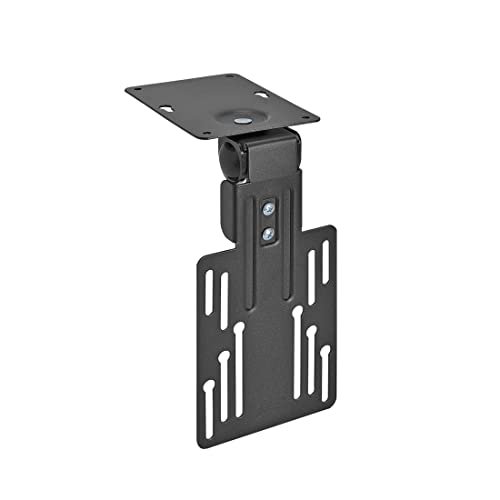
Under kitchen cabinet TV mounts offer a practical way to maximize limited kitchen space while keeping entertainment within easy reach. These mounts secure a television beneath upper cabinets, freeing counter space and positioning the screen at an ergonomic height for cooking, dining, or multitasking. They accommodate small to medium-sized TVs—typically from 13 to 42 inches—and often include adjustable arms for tilt, swivel, or flip-down motion, allowing you to customize the viewing angle without adding bulky stands.
Why Choose an Under-Cabinet Mount for Small Screens?
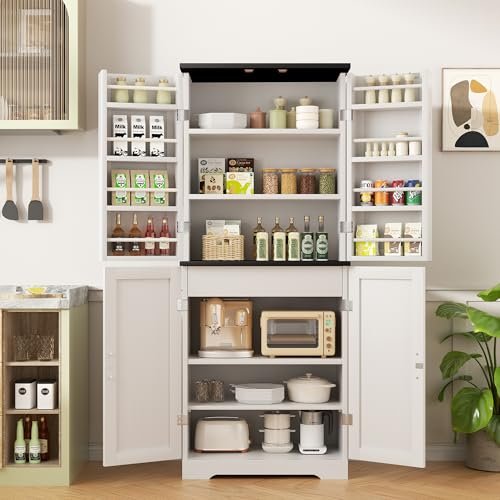
In compact kitchens, every inch counts. An under-cabinet mount utilizes the often-ignored space beneath upper cabinets, keeping the TV out of the way when not in use and tucking it away to reduce visual clutter. This setup is especially beneficial in open-plan living areas where the screen might double as a kitchen companion for recipe streaming or morning news. Because the display hangs lower than a wall mount, it often sits at a more natural viewing height for someone standing at a counter, reducing neck strain during extended meal preparation. For more on this, see our guide on kitchen storage cabinets for small spaces.
Key Considerations Before You Buy
VESA compatibility is the most technical factor to verify. Most modern TVs follow the Video Electronics Standards Association (VESA) pattern, measured in millimeters between the mounting holes on the back of the screen. Common under-cabinet mounts support patterns such as 75×75, 100×100, or 200×200mm. Before purchasing, measure your TV’s VESA spacing and compare it to the mount’s hole pattern; many models list compatible patterns in the product specifications. If your TV uses a non-standard pattern, some manufacturers offer adapter plates, though these can add cost and complexity.
Weight capacity is equally important. A mount rated for 22 lbs may not support a larger LED or OLED panel that exceeds that limit. Always check the combined weight of the TV plus any attached soundbar or streaming device. Mounts with higher capacities—some supporting up to 44 lbs—are better suited for screens in the 32- to 42-inch range. Weight limits are not arbitrary; they account for the bracket’s material strength, bolt thickness, and the way load forces distribute when the screen is tilted or swiveled. For more on this, see our guide on best blenders for smoothies under 100.
Screen size range typically starts around 13 inches and extends to 42 inches for under-cabinet models. Smaller mounts exist for devices like the Echo Show 15 or similar smart displays, which have unique form factors and VESA patterns. If you’re mounting a non-standard screen, look for height-adjustable arms or modular brackets that can be customized. Measuring the diagonal width and height of your device, plus the depth of the cabinet underside, will prevent fitment issues down the line.
Adjustability Features That Matter
Tilt and swivel functions are the most common adjustability features. Tilt allows the screen to angle up or down, which helps reduce glare from overhead lights or windows. Swivel lets you pivot the screen left or right, ideal for open kitchens where seating position changes throughout the day. Some models offer 360-degree rotation, providing flexibility for viewers seated at different angles. In practice, a mount with both tilt and swivel often eliminates the need for a separate full-motion arm, saving space and simplifying installation. For more on this, see our guide on kitchen hood cleaning certification online.
Flip-down mechanisms are popular in RV, boat, and secondary kitchen setups. These brackets allow the screen to fold down from beneath the cabinet when needed and tuck back up when not in use. This design keeps the TV protected from dust and accidental bumps while maximizing floor space. Flip-down mounts typically use a gas spring or friction hinge to control the descent speed, and many include a locking position to hold the screen securely at a preferred angle. If you frequently stow the screen, look for a model with a smooth, tool-free release lever.
Height adjustment is a feature found on articulating arms with extension bars. These allow you to raise or lower the screen within a certain range, accommodating users of different heights or adjusting for counter depth. A long extension arm can project the screen farther into the room, which is useful when cabinet height leaves little vertical clearance. However, longer arms may introduce more wobble; choose a model with reinforced joints or dampening mechanisms if stability is a priority. For more on this, see our guide on kitchen brushes for cleaning.
Installation Best Practices
Begin by locating the studs or solid framing behind the cabinet underside. Use a stud finder and mark the intended drill holes with painter’s tape to avoid damaging the cabinet finish. Pre-drill holes for screws, and select hardware appropriate for your wall material—drywall anchors for hollow walls, masonry bolts for concrete or tiled surfaces. If mounting over a backsplash or tiled area, consider placing the bracket on the cabinet frame itself rather than drilling through tile, which can crack or chip.
For units that require cable management, route wires through the bracket’s internal channels or use adhesive cable clips to keep them tidy. Some mounts include a built-in cable cover; if yours does not, a simple plastic raceway painted to match your cabinet can maintain a clean look. After securing the bracket to the cabinet, attach the VESA plate to the back of the TV, enlist a second person to help lift the screen onto the mount, and double-check that all bolts are tightened to the manufacturer’s torque specification. Over-tightening can strip threads, while under-tightening risks instability. For more on this, see our guide on commercial kitchen hood cleaner.
Mount Types and Use Cases
Fixed under-cabinet mounts hold the screen close to the cabinet surface with no movement. These are the most space-efficient and often the most affordable option, ideal if the viewing angle is already optimal and you rarely adjust the screen. Because there are no moving parts, fixed mounts are also the most stable, making them a solid choice for households with young children or high-traffic kitchens.
Flip-down and articulating mounts provide the most versatility. A flip-down bracket folds the screen downward on a hinge, while an articulating arm extends, retracts, and pivots in multiple directions. These are well-suited for RVs, boats, or multi-purpose rooms where the TV might serve as both a kitchen aide and a living-room screen. Articulating mounts typically offer the greatest range of motion—tilt, swivel, extend, and retract—but they require more clearance behind the screen and may be more complex to install.
Specialized mounts for smart displays exist for devices like the Echo Show 15. These brackets often feature a low-profile design, a thumb-screw height adjustment, and rotation capabilities that accommodate the screen’s tall, portrait-oriented format. Some include whole-aluminum construction for durability and a sleek silver or black finish that matches the device’s aesthetic. If you own a smart display, a dedicated mount ensures a secure fit and avoids the need for generic VESA adapters that may not align perfectly with the device’s mounting points.
VESA Pattern Reference (Common Sizes)
| Screen Size (approx.) | Common VESA Pattern | Typical Mount Capacity |
|---|---|---|
| 13–24 inches | 75×75 or 100×100 mm | Up to 22 lbs |
| 32–42 inches | 100×100 or 200×200 mm | Up to 44 lbs |
| Smart displays (e.g., Echo Show 15) | Manufacturer-specific | Varies by model |
Note: Always verify your TV’s exact VESA measurements and the mount’s listed compatibility before purchasing.
Safety, Compliance, and Maintenance
Because under-cabinet mounts bear the weight of a television and are subject to daily adjustments, following recognized safety guidelines helps prevent accidents and ensures long-term reliability. The U.S. Consumer Product Safety Commission (CPSC) provides recommendations for secure TV mounting in residential settings, emphasizing the use of appropriate hardware for the wall or cabinet material and advising against mounting on drywall alone without anchor support. Following these guidelines can reduce the risk of tip-over incidents, especially in homes with children or pets.
The National Fire Protection Association (NFPA) also offers guidance on placement of electrical equipment near cooking surfaces, noting that mounts should keep screens at a safe distance from heat sources and grease-producing appliances. While the NFPA does not regulate mounting hardware specifically, its guidance on overall kitchen safety is valuable when planning where and how to install a TV. Checking that cables are routed away from hot surfaces and that the mount’s material is rated for the temperature range of your kitchen environment adds another layer of safety.
Regular maintenance includes periodic checks of all screws and moving parts, especially on flip-down or articulating models where hinges and adjustment knobs can loosen over time. Tighten any loose hardware with the provided Allen key or screwdriver, and lubricate metal hinges if the manufacturer recommends it. Inspect the VESA plate and bracket for signs of wear, cracking, or metal fatigue, and replace the mount if any component appears compromised. Keeping the screen and bracket clean with a soft, dry cloth prevents dust buildup that could affect moving parts.
Choosing the Right Mount for Your Space
Start by measuring your screen’s VESA pattern, diagonal size, and weight. Then measure the underside of your upper cabinets: note the available width, the distance from the countertop to the cabinet bottom, and any obstructions such as range hoods or lighting fixtures. If you’re in an RV or boat, also consider vibration and movement; a low-profile, securely fastened mount with limited swing range may be safer than a full-articulating arm. Finally, decide which adjustability features matter most—flip-down for stowability, tilt/swivel for angle correction, or height adjustment for ergonomics—and prioritize models that meet those needs within your budget.
If you’re ready to free up counter space and improve your kitchen viewing experience, begin by documenting your screen’s specifications and cabinet dimensions. From there, compare mounts that offer the right VESA compatibility, weight capacity, and adjustability style for your layout. A well-chosen under-cabinet mount not only saves space but also creates a more organized, ergonomic, and enjoyable cooking environment.
Frequently Asked Questions
How Do I Install An Under Cabinet Tv Mount?
Installing an under-cabinet TV mount is a manageable DIY project when you have the right tools and follow a systematic approach. First, use a stud finder to locate framing members behind the cabinet underside; mounting into studs provides the strongest hold. If studs aren’t aligned with your desired position, use heavy-duty drywall anchors rated for the TV’s weight. Mark the drill holes with painter’s tape to protect the cabinet finish, then pre-drill holes slightly smaller than the screw diameter. Secure the bracket to the cabinet using the provided screws, ensuring they are tightened evenly but not over-torqued, which can strip the threads. Next, attach the VESA plate to the back of your TV, enlist a second person to help lift the screen, and hook it onto the bracket. Finally, double-check all connections, test the tilt or flip-down function if applicable, and confirm the screen is level and secure before leaving it unattended.
What Screen Sizes Fit Under Cabinet Mounts?
Under-cabinet mounts typically accommodate televisions from 13 to 42 inches, though the exact range varies by model. Smaller mounts are designed for devices like the Echo Show 15 or similar smart displays, which have unique dimensions and VESA patterns. Larger screens may require an articulating mount with a higher weight capacity, often 35 lbs or more, to ensure stability. Always cross-reference your TV’s diagonal measurement and VESA pattern with the mount’s specifications before purchasing. If your screen falls outside the listed size range, some manufacturers offer modular brackets or adapter plates, though these can add complexity and cost.
Can I Adjust The Tv Angle Easily?
Yes, most under-cabinet TV mounts offer straightforward angle adjustments. Models with tilt functionality allow you to angle the screen up or down, which helps reduce glare from overhead lights or windows. Swivel features let you pivot the screen left or right, ideal for open-plan kitchens where viewing positions change throughout the day. Flip-down mounts enable you to bring the screen down to counter level when in use and tuck it back up when finished, often with a single lever or gas-spring assist. Adjustments are typically tool-free, using knobs, levers, or thumb screws, but always ensure the mount is firmly installed before making any changes to avoid accidental movement.
Are These Mounts Space-Saving Solutions?
Absolutely. Under-cabinet mounts are specifically designed to utilize vertical space that would otherwise go unused, keeping the television off countertops and out of the way when not in use. Flip-down and articulating models further enhance space efficiency by allowing the screen to be stored vertically against the cabinet or swung out of the path of foot traffic. This design is especially valuable in small kitchens, RVs, or boats where every square inch matters. By mounting the screen beneath cabinets, you maintain clear counter space for food preparation and keep the room feeling less cluttered.
Is A VESA-Compatible Mount Necessary?
Yes, a VESA-compatible mount is crucial for a stable and secure installation. VESA standards define the distance between the mounting holes on the back of a television, ensuring that the bracket and screen interface correctly. Most under-cabinet mounts support common patterns such as 75×75, 100×100, or 200×200mm, but some models offer adjustable VESA plates to fit a broader range of screens. Checking your TV’s VESA measurement—usually listed in the user manual or measured directly with a ruler—before buying a mount prevents compatibility issues and ensures the screen hangs level and secure. Using a non-VESA or mismatched mount can result in an unstable setup and may void the manufacturer’s warranty.
Conclusion
Selecting the right under-kitchen-cabinet TV mount transforms a compact cooking space into a functional, entertainment-friendly area. These mounts capitalize on often-overlooked vertical real estate, keeping small screens accessible while freeing counter space for meal preparation. By prioritizing VESA compatibility, appropriate weight capacity, and the adjustability features that match your daily routines—whether that’s tilt for glare reduction, swivel for flexible viewing, or flip-down for stowability—you can achieve a setup that feels both secure and intuitive. Compliance with recognized safety guidelines from agencies like the CPSC and NFPA further ensures that your installation remains stable and your kitchen stays safe. With the variety of models available, from fixed brackets for minimalist setups to articulating arms for dynamic spaces, there is a solution tailored to nearly every layout and screen size. Measure your space, verify your screen’s specifications, and explore the options to find a mount that enhances both your kitchen’s functionality and your viewing experience.
If you’re ready to declutter your countertop and bring your small screen into optimal viewing position, start by measuring your VESA pattern and cabinet dimensions today—your future self will thank you when cooking becomes more enjoyable and your kitchen feels more spacious.

Hi, I’m Daniel Brooks—a food lover and kitchen gear enthusiast. I enjoy testing cookware, utensils, and gadgets to see what really works in everyday cooking. At PlugChef.com, I share honest reviews, comparisons, and simple guides to help you choose the best tools for a safer, smarter, and more enjoyable kitchen.
Similar Posts