Under the Counter TV for Kitchen: Maximize Space with Smart Viewing
Installing a television in a standard living room is straightforward, but adding one to a kitchen presents unique spatial and functional challenges. Traditional wall-mounted screens are often too high, angled poorly, or obstructed by open shelving and cabinets. An under-the-counter TV solves this by tucking the display into the dead space beneath cabinetry, delivering eye-level viewing while cooking, cleaning, or waiting for food to cook.
This guide moves beyond simple product listings to provide a comprehensive blueprint for selecting, installing, and integrating compact smart displays into your culinary space. We will analyze the physics of kitchen ergonomics, compare smart operating systems for wet environments, and detail the specific mounting hardware required to keep these devices safe and secure. Whether you are renovating a galley kitchen or upgrading an RV, this resource offers the technical depth needed to make an informed decision. For more on this, see our guide on best blenders for smoothies under 100.
Why Under-the-Counter TVs Are Gaining Traction
The shift toward multifunctional kitchen appliances is driven by a desire for convenience without sacrificing workspace. A standard wall-mounted TV in a kitchen often requires neck strain to view, as screens are typically installed 48–54 inches from the floor to match living room standards. In a kitchen, however, the "eye-level" zone is significantly lower, roughly between the counter height (36 inches) and the bottom of upper cabinets (48–54 inches).
Ergonomics and Workflow Efficiency
In practice, a common mistake is assuming a living-room mount will work for a kitchen setup. It rarely does. Kitchen workflows involve standing at the counter, leaning over the sink, or moving between islands. An under-cabinet or flip-down screen aligns with the natural line of sight for someone standing at a 36-inch counter. This allows users to follow recipe videos, stream music, or watch sports without moving away from the prep zone. For more on this, see our guide on kitchen hood cleaning certification online.
Space Optimization
For small apartments, RVs, and yachts, floor and counter space are premium resources. A traditional TV stand or wall bracket consumes valuable visual real estate. Integrated under-counter solutions utilize otherwise unusable space, keeping countertops clear for food preparation. This is particularly critical in compact living environments where every square inch of counter space is used for daily tasks.
Key Features to Consider When Selecting a Kitchen TV
Not all small screens are created equal. Kitchen environments are hostile to standard consumer electronics due to heat, steam, grease, and moisture. When evaluating models, look for specific hardware and software features designed for this use case. For more on this, see our guide on kitchen brushes for cleaning.
Screen Technology and Resolution
Most under-counter TVs range from 10 to 24 inches. A 15.6-inch display is the industry standard for this niche, offering a balance between visibility and footprint.
- Resolution: Look for 1080p (Full HD) or 1366×768. While 4K is marketing hype for screens this size, 1080p provides crisp text for recipes and vibrant visuals for streaming.
- Brightness: This is the most critical spec. Kitchens are bright spaces. Standard TVs are rated for dim living rooms. For kitchen use, you need a screen with a brightness rating of at least 300 nits, ideally higher. In practice, low-brightness screens become nearly invisible when natural light hits the counter or when under-cabinet LED lighting is on.
Smart OS and Connectivity
A "dumb" TV requires external streaming sticks, which adds cables and bulk. Look for integrated Smart OS:
- Google TV / Android: Best for app variety (YouTube, Netflix, Prime Video). Ensure it supports Chromecast for quick mobile-to-TV casting.
- Fire TV: Popular for Amazon Prime users, with a simple interface.
- Basic Linux: Some ultra-budget options lack app stores. These are fine for watching cable or HDMI input but less convenient for streaming.
- WiFi & Bluetooth: Essential for casting and audio routing. Many modern kitchen TVs allow you to connect Bluetooth speakers or headphones to avoid disturbing others in the house.
Power Requirements
Standard kitchen TVs use AC power (120V in North America). However, for RVs, boats, or off-grid cabins, DC power (12V/24V) capability is crucial. If you are considering a model for a mobile home, verify it accepts DC input or supports a dual-voltage power supply. For more on this, see our guide on commercial kitchen hood cleaner.
Top Recommendations for 2026: Best Under-Counter and Compact TVs
Based on current availability, build quality, and user feedback, the following models represent the best options for kitchen integration.
1. SYLVOX 15.6" Flip-Down Smart TV (Best All-Rounder)
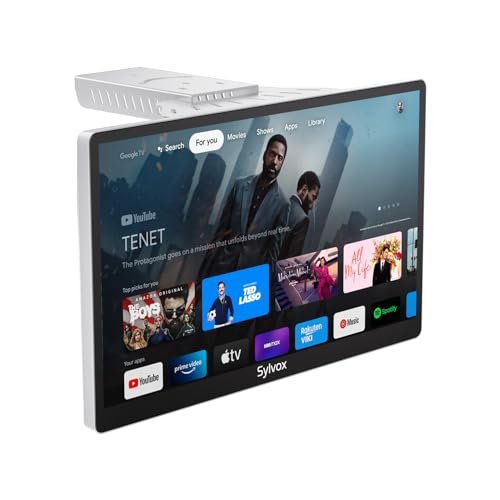
The SYLVOX line has become the benchmark for compact kitchen displays. This model features a flip-down mechanism, allowing the screen to tuck away when not in use. It runs a customized Android OS with Google Assistant support. For more on this, see our guide on industrial kitchen cleaning companies.
- Why it works: The flip-down design protects the glass from grease and steam when cooking. The 1080p panel is brighter than many competitors in the same price class.
- Best for: Home cooks who want a "candy bar" style look when the TV is closed.
 The SYLVOX flip-down design tucks neatly against the cabinet face, keeping the kitchen look clean when not in use.
2. SYLVOX 15.6" Under-Cabinet Rotatable Model (Best for Angles)
If you have a fixed counter depth, a rotatable model allows you to angle the screen toward a seating area or island. This version typically includes a 360-degree swivel mount and a foldable bracket.
- Why it works: Flexibility. You can face the screen toward the sink, the stove, or a nearby dining table.
- Best for: Open-concept kitchens where the TV serves multiple users in different zones.
 This rotatable model allows the screen to be angled toward a kitchen island or dining nook for optimal viewing.
3. Mount-It! Compact Folding Ceiling/Under-Cabinet Bracket (Best Hardware)
Sometimes, you have a generic 15-24 inch TV and need the hardware to make it work. The Mount-It! folding bracket is engineered for small screens up to 24 inches. It supports VESA patterns (50×50, 75×75, 100×100) and holds up to 18 lbs.
- Why it works: It is a universal solution. If you prefer a cheaper, non-smart TV, this bracket allows you to flip it down from under the cabinet.
- Best for: DIYers who want to use a standard small TV rather than a dedicated kitchen unit.
 The Mount-It! bracket provides the structural support needed to flip a standard small TV down for viewing.
4. Sony ICF-DVD57TV (Best Vintage/Retro Option)
While newer models focus on smart streaming, the Sony ICF-DVD57TV remains a favorite for those who prefer physical media or a retro aesthetic. It combines a small LCD screen with a built-in DVD player, CD player, and clock radio.
- Why it works: No internet required. It is a self-contained unit that doesn’t rely on WiFi or app stores.
- Best for: Campers, workshops, or users who prefer streaming-free entertainment.
 The Sony ICF-DVD57TV offers a self-contained, offline entertainment experience, ideal for spaces without reliable internet.
Installation Guide: Mounting Safely Under Cabinets
Installing a TV under a kitchen cabinet is not just about drilling holes; it involves weight distribution, cable management, and heat clearance.
Step 1: Determine Weight and Load
Standard kitchen cabinets are not always rated for heavy objects. A 15.6-inch TV weighs roughly 5–7 lbs. However, the mounting bracket adds another 2–3 lbs.
- Check your cabinet: If it is a solid wood cabinet, it will likely hold the weight. If it is cheap particleboard, you must anchor the bracket directly into the wall studs behind the cabinet, not just into the cabinet shelf.
- Use a stud finder: Locate studs before drilling. If the cabinet is floating, you may need to install a heavy-duty rail system behind it.
Step 2: Cable Management
Cables are the first point of failure in kitchen installations.
- Hidden routing: Use in-wall speakers or hidden wire channels if possible.
- Cable sleeves: If cables must run externally, use white or beige cable sleeves to match the decor. Never drape cables over the edge of the cabinet where they can be pulled.
- Power: Use a GFCI (Ground Fault Circuit Interrupter) outlet if the TV is near a sink. Standard dry-location outlets are acceptable a safe distance away.
Step 3: Heat and Moisture Clearance
Range hoods and ovens generate significant heat.
- Rule of thumb: Do not install any TV within 24 inches of a direct heat source (like the center of a range hood).
- Venting: Ensure the back of the TV is not blocked by the cabinet bottom. Some flip-down models require 2-3 inches of clearance when the screen is closed.
- Steam: Position the TV above the primary steam source (like the sink) or ensure it is angled away. Many modern kitchen TVs have IP-rated seals, but this is not guaranteed for all models.
Kitchen TV Placement: A Practical Guide to Angles and Height
Even with a fixed under-counter mount, angle matters.
The "F" Zone
Imagine an "F" shape: The top bar represents your eyes when standing at the counter, and the vertical bar points down. Your screen center should align with the top bar of the F. If the TV is too low, you look down. If it’s too high (standard wall mount), you look up. Under-counter units are naturally low, which is why flip-down mechanisms are popular—they can angle the screen up 30-45 degrees to meet your eyes.
Viewing Distance
For a 15-inch TV, the ideal viewing distance is 2 to 3 feet. If you are sitting at a far-end island, a 15-inch screen may be too small. In this case, consider a 24-inch model or a projector.
Frequently Asked Questions
What size TV fits under a standard kitchen cabinet?
Standard lower cabinets are 30 inches deep. A 15.6-inch TV fits easily. A 24-inch TV may protrude slightly but is usually manageable if mounted flush. The limiting factor is usually the cabinet depth and the bracket’s swing radius.
Can I install a TV over the sink?
Yes, but you must use a GFCI outlet. Ensure the TV is not placed where splashing is likely. Flip-down models are safer here because you can close them when washing dishes.
Do under-counter TVs heat up the kitchen?
Modern LEDs run cool, but they do generate some heat. In a small, poorly ventilated kitchen, this can contribute to ambient temperature. Ensure there is at least 1-2 inches of air gap between the back of the TV and the cabinet underside.
Are these TVs suitable for RVs?
Yes, but only if they support 12V DC power. Most AC-only TVs will damage an RV battery system if used without a proper inverter. Look for "Dual Voltage" or "12V/24V/110V" compatibility.
Conclusion
An under-the-counter TV is a smart investment for any kitchen that serves as a central hub of the home. It transforms idle time into entertainment time without cluttering precious counter space. When selecting a model, prioritize brightness, smart OS capabilities, and proper mounting hardware.
For most users, a 15.6-inch smart TV with a flip-down or rotatable bracket offers the best balance of size, feature set, and installability. If you are in an RV or marine environment, strictly filter for DC power compatibility. By following the installation guidelines regarding weight distribution and heat clearance, you can integrate a screen that enhances your kitchen workflow for years to come.
For more tips on organizing and maintaining your compact living spaces, explore our guide on [space-saving storage solutions] or check out our review of [compact kitchen gadgets] for other small-space upgrades.

Hi, I’m Daniel Brooks—a food lover and kitchen gear enthusiast. I enjoy testing cookware, utensils, and gadgets to see what really works in everyday cooking. At PlugChef.com, I share honest reviews, comparisons, and simple guides to help you choose the best tools for a safer, smarter, and more enjoyable kitchen.
Similar Posts