Kitchen Under Cabinet Lighting LED: Transform Your Space with Vibrant Illumination

Under cabinet lighting is one of the highest-impact, lowest-effort upgrades you can make to a kitchen. It eliminates the harsh glare of overhead lights that cast shadows across your cutting board, reveals the texture and grain of your cabinetry, and adds layered depth that overhead fixtures alone can't provide. A well-chosen LED kit can double task performance on the counters while cutting energy draw dramatically compared to halogen or incandescent equivalents.
This guide walks through the four dominant under-cabinet LED categories — smart RGB, rechargeable magnetic, hardwired, and plug-in linkable — breaks down the specs that actually matter (lumen output, color temperature, CRI, beam angle, IP rating), shows you how to size a kit to your run length, and flags the installation pitfalls that catch even experienced DIYers. Every product reviewed below is a current Amazon listing with a direct checkout link so you can shortlist without hopping sites. For more on this, see our guide on best blenders for smoothies under 100.
Why Under Cabinet LED Lights Outperform Overhead Lighting
Overhead kitchen lighting is designed to illuminate the room, not the surface where you work. The result is predictable: bright cabinets, dark countertop, and shadows falling directly where your knife, your recipe card, and your measuring cup live. Under cabinet lighting inverts that priority.
Task lighting mounted beneath a cabinet face lights the work surface and nothing else. The light hits the counter, the backsplash, and the front face of the cabinet above, then stops. That focused distribution means you get more useful lumens per watt, less light spill into your eyes, and fewer hot spots when multiple people are in the kitchen at once. The Lighting Research Center — the industry body behind most residential lighting guidance — consistently recommends layered lighting schemes that combine ambient, task, and accent sources, and under-cabinet LEDs are the textbook task layer for kitchens. For more on this, see our guide on kitchen hood cleaning certification online.
A practical side effect of this layering is ambiance. Dimmed under-cabinet LEDs in a warm color temperature create an immediately different feel in the room than the same kitchen under its overheads. That's why a lot of hospitality interiors specify under-cabinet lighting as a separate circuit — you can turn it off during the day and let it set the mood in the evening.
Four Types of Under Cabinet LED Lighting
The market sorts into four distinct families. Choosing the right one is more important than comparing individual products within a family. For more on this, see our guide on kitchen brushes for cleaning.
Smart RGB Kit
App-controlled, color-changing, voice-assistant compatible. The most feature-dense option, and the only one that delivers decorative rather than purely functional lighting. Best for kitchens where you want a single strip to shift from 3000K task white to 6500K daylight and to a full RGB spectrum for evenings.
Rechargeable Magnetic Bar
Battery-powered, motion-sensor-equipped, magnet-mounted. Zero wiring, zero drilling. Best for renters, closets, pantries, stairwells, and anyone unwilling to touch an outlet. The trade-off is periodic recharging and a battery life of a few hours per charge under sustained use.
Hardwired Strip
Wired into the house circuit, usually via a dedicated switch or dimmer. The most professional, most reliable, and most energy-efficient long-term option. Requires either DIY wiring skill or a licensed electrician, and typically a cabinet with existing access to a junction box or nearby outlet.
Plug-In Linkable Bar
Battery-free, but plugged into a wall outlet via a short cord or USB. Sits between hardwired and rechargeable on the convenience-versus-permanence spectrum. Often supports chainable runs of multiple bars for longer counters.
Key Specifications That Actually Matter
Marketing copy on LED products tends to emphasize marketing words ("super bright," "vibrant," "smart") rather than the specs that determine whether a strip will perform well in your kitchen. These are the ones to compare.
| Spec | What it means | What to look for |
|---|---|---|
| Lumens (lm) | Total light output | 80–100 lm per linear inch for kitchen task light |
| Color temperature (K) | Warmth vs. coolness of white light | 3000K warm, 4000K neutral, 5000K–6500K daylight |
| CRI (Ra) | Color accuracy | 85+ minimum; 90+ for detailed tasks |
| Beam angle | How wide the light spreads | 120° for even wash; narrower for accent |
| Wattage | Power draw | 1.5–2.5 W per linear foot for standard strips |
| IP rating | Moisture/dust protection | IP44+ for kitchens, IP65+ for outdoor |
| Dimming method | How brightness is reduced | PWM, trailing-edge, or app-controlled |
The most common mistake is buying a strip with impressive lumen counts but poor color rendering. A 6500K strip with a CRI of 75 looks fine on packaging photos but renders food colors, wood tones, and skin tones with a slight tint. For a kitchen where you're prepping dinner for friends, a CRI of 90+ is the difference between seeing a red tomato as red and seeing it as pink-brown.
How to Size a Kit to Your Kitchen
Run length is the first calculation. Measure the visible face of each cabinet that will get a strip, then add 10% for cutting margins. Most strips come in 10-inch, 12-inch, or 24-inch segments, and connectors join them into continuous runs.
For a typical 10-foot counter you'll need roughly 50–60 linear inches of LED bar. That breaks down to about 4–6 twelve-inch bars or 2–3 twenty-four-inch bars. Factor in corners: every 90-degree turn usually eats 1–2 inches of usable length, and you'll want to offset the strips slightly at each turn so the light washes evenly across both counter sections rather than creating a dark seam.
Battery capacity matters equally for rechargeable kits. Look for a stated mAh figure on the strip or its battery pack; anything under 800 mAh in a 10-inch bar will typically last a single evening of continuous use, while 1800–2400 mAh units run for 8+ hours at moderate brightness.
Where to Place the Lights for Maximum Effect
Mounting position is where most under-cabinet installations go wrong. Three placement patterns work well:
- Front of the cabinet face. Closest to the counter edge, this puts the brightest pool on the countertop itself. Best for pure task lighting.
- Back of the cabinet face, near the wall. Washes the backsplash, making it read as a decorative feature. Best for kitchens with a strong backsplash or tile accent.
- Centered on the cabinet face. A compromise that lights both counter and backsplash evenly. Best for a balanced, no-hot-spots install.
For corners and window bays, offset the strip 1–2 inches from the wall so light hits the corner diagonally rather than directly. Direct-to-wall placement creates a harsh shadow line and an uneven wash that reads as unfinished.
Under-cabinet lighting is just one task layer in a well-lit kitchen — for the broader approach, see task lighting layers for a walkthrough of how to plan illumination across an entire room before you buy anything.
Product Roundup: Best Under Cabinet LED Kits for 2026
Maylit 10-Piece Smart RGB Under Cabinet Light Kit
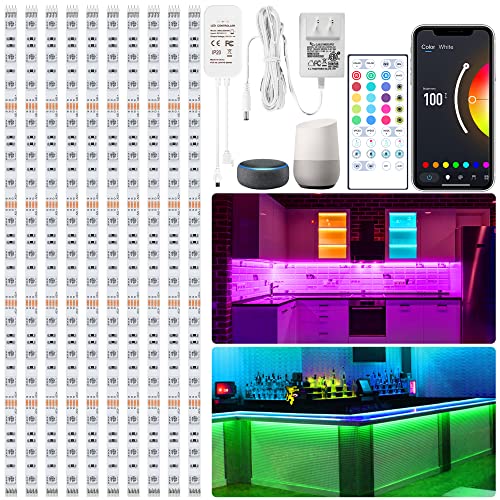
Ten-segment smart RGB kit with app control, voice assistant pairing, and music sync — the most feature-complete option in this roundup.
Best for: Tech-forward kitchens, renters who want smart-home integration without rewiring, and anyone who wants decorative as well as functional lighting.
The Maylit kit is the only RGB-capable system in this roundup, and it shows in the feature set. It pairs with Alexa and Google Assistant for hands-free control, works through its own app with per-segment scheduling, includes a remote for quick adjustments, and offers a music sync mode that pulses color to audio input. The 10-piece kit gives you enough length to cover a standard galley counter or two parallel cabinet runs.
Pros
- Alexa and Google Assistant voice control
- App, remote, and timer controls
- Music sync for ambiance modes
- Full dimming across the color spectrum
- No wiring required — battery or USB powered
Cons
- Wi-Fi required for smart features; remote still works offline
- Initial pairing can take 10–15 minutes for all 10 strips
- RGB modes are decorative — daily task lighting uses the white modes, which are less bright than a dedicated task strip
For kitchen setups where you'll mostly use warm-white task lighting but occasionally want the RGB effect for a dinner party or holiday, this is the strongest all-rounder. Shop the Maylit kit to see current pricing.
Gritin 10.2-inch Rechargeable Under Cabinet Lights (2-Pack)

Motion-sensor-equipped 10.2-inch bar with three color modes, five brightness levels, and magnetic installation.
Best for: Renter-friendly installs, closet and pantry lighting, and anyone who wants hands-free activation.
The Gritin bar is a strong pick for spaces you want lit but don't want to touch. Motion sensing activates the light when you approach and lets it fade out when you step away, which is genuinely useful in a kitchen where your hands are often full of produce or a dish towel. It offers three color temperatures and five brightness levels, covering most use cases from a dim pantry glow to full task brightness.
Pros
- 84 LEDs on a 10.2-inch bar deliver substantial lumen output
- Three color modes and five brightness levels
- Motion sensor eliminates daily manual toggling
- Magnetic attachment — repositionable in seconds
- USB-C rechargeable, no throwaway batteries
Cons
- Magnetic back requires a ferrous surface; wood cabinets need an adhesive pad adapter
- Motion sensor can trigger from passing footsteps in a hallway-adjacent kitchen
- Battery life under continuous use is around 4–6 hours
Magnetic installs on non-metal cabinets are the most common user error. A dollar-store adhesive pad on the magnetic face fixes it, but budget 10 minutes per bar to prepare. Check the Gritin 2-pack for the current deal.
Olalits Under Cabinet Lighting Kit

Rechargeable motion-sensor under-cabinet bar with three brightness levels and magnetic backing.
Best for: Small-space task lighting, renters on a budget, and quick-add light to dark corners.
The Olalits bar sits at the budget end of the motion-sensor category. It trades some brightness levels (three, not five) and some color variety for a lower price point, and it performs well in its target role: quick, hands-free lighting for a dark corner of the counter, a pantry, or a basement utility space.
Pros
- Motion-activated for zero-touch operation
- Rechargeable — no ongoing battery cost
- Three brightness levels cover most tasks
- Magnetic back for repositionable installs
- Small enough to fit under shallow cabinets
Cons
- Battery drains noticeably faster than higher-capacity models
- Magnetic mount requires a ferrous surface
- Narrower beam angle than wider-spread competitors
For pantry or closet use where you don't need the last hour of runtime, this is a fine bargain. Shop the Olalits kit if it fits your space.
Maylit Plug-In Under Cabinet Lights (3-Piece, 12-inch)

12-inch ultra-thin plug-in bar in daylight white with dimming — the go-to task-light choice.
Best for: Cooks who prioritize visibility on the counter, and anyone who wants a single, consistent color temperature.
The Maylit plug-in kit is the most straightforward task-light option in this roundup. Three twelve-inch bars in a 6500K daylight white deliver strong, even illumination directly onto the counter, with an inline dimmer for softer evenings. No battery, no charging, no smart features — just reliable, bright, dimmable light whenever the plug is in.
Pros
- 6500K daylight white maximizes counter visibility
- Ultra-thin profile stays out of the way of stored items
- Plug-in — no charging, no batteries
- Inline dimmer for adjustable brightness
- Simple install: plug into a nearby outlet
Cons
- Single color temperature — no warm option
- Cord management required to keep runs neat
- Fixed 12-inch length may require more bars for longer counters
For a kitchen where visibility matters more than flexibility, this is the pick. See the Maylit plug-in kit for current pricing.
UltraPro 24-Inch Hardwired Under Cabinet Lights
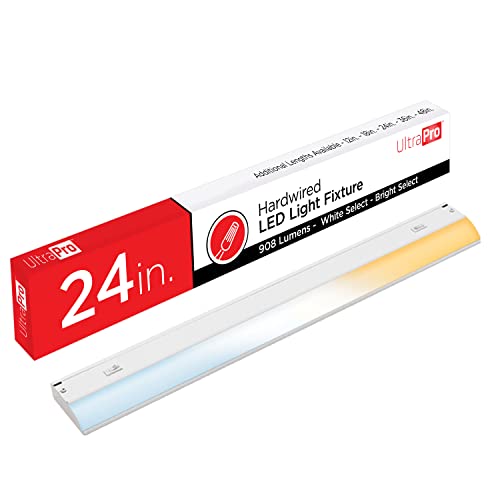
24-inch hardwired strip with three color temperature modes and full dimming — the pro-grade option.
Best for: Homeowners planning a permanent install, and anyone with a licensed electrician on speed dial.
The UltraPro hardwired strip is the ceiling of the under-cabinet category. Three switchable color temperatures — 2700K warm white, 4000K cool white, 5000K daylight — cover any mood or task, and full dimming means you can go from meal-prep brightness to dining-ambiance glow with one gesture. Hardwiring removes the cord clutter of plug-in kits and eliminates battery anxiety entirely, but it does require a licensed electrician for the initial run.
Pros
- Three color temperatures on a single switch
- Full dimming range
- Hardwired for clean, professional appearance
- No battery replacement, no charging cycle
- 24-inch length covers larger counter runs with fewer seams
Cons
- Requires professional installation
- Higher upfront cost than plug-in or rechargeable kits
- Only white options — no RGB or decorative modes
- 24-inch length is too long for small cabinets without cutting
Hardwired is the right call if you own the home and plan to stay for years. For renters and shorter tenures, the other options in this roundup make more financial sense. Check the UltraPro strip for the current listing.
DAYBETTER 6-Piece Under Cabinet LED Kit (9.8 ft)

Six-piece dimmable kit covering 9.8 feet with a wide 2700K-to-6500K color range and remote control.
Best for: Kitchens of any size that need one strip covering multiple color temperatures, and renters who want flexible placement.
DAYBETTER's 6-piece kit covers 9.8 feet and spans a full 2700K-to-6500K color range on a single remote. That's a lot of coverage from one kit — enough to light a full galley counter, two parallel cabinet runs, or a kitchen counter plus a home-office desk. The remote handles dimming and color temperature switching without needing an app.
Pros
- 2700K to 6500K covers every white mode
- Six-piece kit gives long run-length coverage
- Remote control for hands-free adjustment
- Plug-in power — no batteries to maintain
- Works beyond the kitchen for desks, bookcases, TVs
Cons
- Remote runs on batteries that will need periodic replacement
- 9.8-foot total length is enough for most kitchens but short for large galley runs
- Cable management is manual across the 6-segment chain
For a single-knock install that hits every color temperature and covers most of your counter in one go, this is the value pick. See the DAYBETTER kit.
WOBANE 6-Piece Under Cabinet LED Kit
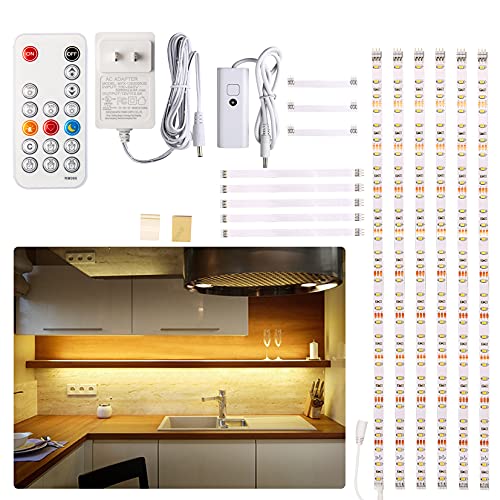
Six-segment warm-white LED kit with remote dimming and 1500-lumen output.
Best for: Buyers who want a consistent warm-white glow across a full kitchen run, and anyone building a layered lighting scheme.
The WOBANE kit delivers a single warm-white color temperature (2700K) at a rated 1500-lumen output across its six segments. That's a lot of lumens for a warm tone, which is uncommon — warm-white strips usually trade brightness for warmth. It's a solid choice for kitchens where the overhead lighting already handles bright task work and you want under-cabinet to set a warm, layered mood.
Pros
- 1500-lumen output is strong for a warm-white strip
- Six segments allow long continuous runs
- Remote dimmer for easy brightness adjustment
- Adhesive backing plus connectors — installable by hand
- Consistent 2700K across the whole kit
Cons
- Warm white only — no cool or daylight option
- Remote runs on batteries
- Adhesive backing is permanent; repositioning requires new adhesive
If your kitchen's overheads are already cool-white, adding a warm-white under-cabinet layer creates the ambient depth that hospitality kitchens are known for. Shop the WOBANE kit.
Vovamo Plug-In Under Cabinet Lighting (2-Pack, 12-inch)

Twelve-inch cool-white plug-in bar in a USB-powered, linkable 2-pack.
Best for: Minimalist kitchens, workbench lighting, and users who want a USB-powered setup.
The Vovamo kit is the leanest plug-in option here — two twelve-inch bars, cool white at 6000K, USB-powered, linkable for longer runs. USB power is a quiet advantage: it means the strip draws from any power bank, laptop, or USB wall adapter, which opens up placement in spots where a standard outlet is inconvenient.
Pros
- USB power for flexible placement
- 6000K cool white delivers high counter visibility
- Linkable design for extended coverage
- Compact and unobtrusive
- Dimmable for mood flexibility
Cons
- Cool white only — no warm option
- Requires wired power, not battery
- Cord management is manual across linked bars
For a home office desk or a kitchen niche that's hard to reach with a standard outlet, the USB power source makes Vovamo one of the more versatile plug-ins. See the Vovamo kit.
MCGOR 10-inch Rechargeable Under Cabinet Lights (2-Pack)

Ten-inch rechargeable bar with motion sensing, five brightness levels, and magnetic mounting.
Best for: Stairwells, closets, and renter-friendly under-counter lighting that needs motion activation.
The MCGOR kit is another strong motion-sensor option in the rechargeable category. Its five brightness levels are more granular than most competitors in the price range, and the magnetic base is straightforward to use on steel appliances and ferrous surfaces. It's a fine pick for stairwells and closets where motion-triggered, dimmable lighting does more work than a simple on-off switch.
Pros
- Five brightness levels for fine-grained control
- Motion sensor for hands-free operation
- USB-C rechargeable
- Magnetic install — no adhesive required
- Compact 10-inch form factor
Cons
- Battery needs recharging roughly weekly in active use
- Motion sensor can false-trigger in a hallway-adjacent space
- Magnetic base needs a ferrous surface or an adapter pad
If your kitchen has a dim stairwell or a hard-to-reach upper cabinet you'd like to light hands-free, MCGOR is a reliable fit. Check the MCGOR kit.
AMETHEUS 6-Pack Under Cabinet Lighting

Six-piece wireless rechargeable kit with three color temperatures, dimming, and motion sensing.
Best for: Whole-home lighting needs across multiple rooms, closets, and stairwells.
The AMETHEUS 6-pack is the largest kit in this roundup and the most versatile. Six wireless, rechargeable bars with motion sensing, dimming, and three color temperatures cover everything from a full kitchen run to individual stairwell steps and closet interiors. The size of the kit makes it worth the upfront cost if you're doing more than one room.
Pros
- Six-bar kit covers multiple rooms
- Three color temperatures and dimming
- Motion sensor for hands-free use
- Rechargeable and wireless — no cords
- Compact 8-inch form factor fits small spaces
Cons
- Requires recharging roughly weekly in active use
- Motion sensor can trigger unintentionally in tight spaces
- Indoor use only — not waterproof for outdoor installs
- Higher total cost than smaller kits
For a household that wants to light kitchen, closets, and stairwells with the same product line, the AMETHEUS 6-pack avoids mixing brands. Shop the AMETHEUS 6-pack.
Installation Best Practices
Under-cabinet installation trips up even experienced DIYers in predictable ways. A few things worth knowing before you start:
Clean the surface first. Adhesive and magnetic strips both fail on oily or dusty cabinet faces. Wipe the install area with rubbing alcohol and let it dry for 60 seconds before applying. This is the single most common cause of strips falling off in the first month.
Test before you finalize. Plug strips in and power them on before fully bonding adhesive or magnet. You'll catch reversed orientation, kinks, and dead segments before they're stuck under a cabinet.
Route cords thoughtfully. Plug-in and USB kits all have cords, and the visible ones are the ones that spoil the clean look. Run cords along the back of the cabinet, tuck them behind the wall or appliance backsplash, and use a cord clip at each turn.
Respect IP ratings for kitchens. A kitchen splashback zone is not the same as a bathroom. Look for IP44 as the minimum for any strip within arm's reach of the sink or stove, and IP65 if the strip is in a location where it could be directly splashed. Check the manufacturer's spec sheet rather than marketing copy — the spec is the actual rating.
Match dimmers to the strip. Not every dimmer is compatible with every strip. PWM (pulsed-width modulation) dimmers work with most LED strips, but some strips require a specific trailing-edge or app-based dimmer. Read the compatibility list before buying separately.
Safety and Standards to Check
The U.S. National Electrical Code — maintained by NFPA — governs all permanent wiring in residential spaces, including hardwired under-cabinet lighting. For anything wired into the house circuit, use a licensed electrician or a strip that carries a UL or ETL listing, both of which indicate the product has been independently tested.
For plug-in and rechargeable products, look for FCC certification (indicates the product is tested for radio-frequency emissions) and, if it uses lithium batteries, a UN 38.3 certification marking on the packaging, which covers lithium transport safety. Reputable brands include these marks on the product box and on the strip's adhesive backing.
Skip any product that lacks these certifications. Under-cabinet lighting is a low-voltage fixture, but a poorly designed lithium pack or an untested power adapter is a fire risk that isn't worth the savings.
Maintenance and Longevity
LED strips are rated for lifespans measured in tens of thousands of hours, but that rating assumes the strip is run within its rated voltage and temperature range. In practice, the most common failure modes are:
- Adhesive failure, usually in kitchens with high humidity or near the stove where heat degrades the adhesive. Reapply a small amount of weatherproof silicone if a bar falls.
- Dead segments caused by a failed LED on the strip, which often goes out in isolation rather than along the whole strip. Most manufacturers replace segments under warranty — keep the receipt.
- Dimmer drift, where a smart dimmer slowly loses its range over time. A firmware update via the manufacturer's app usually fixes this.
For rechargeable kits, charge them monthly even if they're not in active use. Lithium batteries degrade faster when stored at very low charge, and a six-month gap between charges can shorten overall battery life noticeably.
Under-cabinet lighting is the easiest lighting layer to install and one of the fastest ways to level up a kitchen — for more room-by-room guidance, explore lighting layering basics to see how under-cabinet fits into a full plan.
Frequently Asked Questions
How do I install under cabinet LED lights?
For plug-in kits, attach the adhesive or magnetic base to the cleaned cabinet face, plug into a nearby outlet, and route the cord behind the cabinet or into the wall. For hardwired kits, a licensed electrician runs a dedicated circuit from a nearby junction box to a junction near the cabinet. Battery and rechargeable kits just need the magnetic or adhesive base applied — no wiring at all. Always test the strip before finalizing its position.
Can under cabinet lights be controlled remotely?
Yes. Most modern kits include either a physical remote control, a smart-home app with voice-assistant integration, or both. Smart kits can also run schedules, so lights come on in the morning or dim in the evening automatically. Physical remotes typically use IR or 2.4GHz RF; smart kits use Wi-Fi or Bluetooth Low Energy.
Are LED cabinet lights energy efficient?
Very. A typical 10-inch under-cabinet LED strip draws 1.5–2.5 watts, compared to 25–40 watts for a comparable halogen tube. Over a full year of evening use, that difference saves several dollars per strip in electricity costs — trivial per strip, meaningful across a full kitchen run. LEDs also last 25,000+ hours, so replacement bulbs are rare.
What are the benefits of motion sensor lights?
Motion sensor lights eliminate the manual on/off step, which is genuinely useful when your hands are occupied with produce, dishes, or a recipe. They also conserve battery life by only drawing power when movement is detected — relevant for rechargeable and battery kits. The trade-off is occasional false triggers from passing footsteps or pets, and a small ambient-light threshold you may need to tune.
Can LED lights sync with music?
Some smart RGB kits support music sync, where the strip pulses or changes color in rhythm with audio picked up by a built-in microphone. The Maylit 10-piece kit in this roundup is one example. Music sync is decorative rather than functional — it's best used for evenings rather than task lighting, and most users pair it with a warm-white default for the daytime.
Do under cabinet lights come in different colors?
Two kinds of "color" matter here. First, color temperature — warm white (2700K), neutral white (3500–4000K), and daylight white (5000K–6500K) — which affects how the light looks on surfaces and skin tones. Second, RGB color-changing strips, which produce any hue of the spectrum for decorative use. Many modern kits offer both modes on a single strip.
How much light is enough for a kitchen counter?
A useful rule of thumb is 5000–7500 lux at the counter surface for meal prep, and 1000–2000 lux for ambient evening use. Most well-chosen 10-inch LED bars at moderate brightness hit these targets within a couple of feet of the strip. If your counter feels dim mid-depth, either move the strip closer to the cabinet front or add a second strip offset by 3–6 inches.
Do I need a dimmer for under cabinet lighting?
For task lighting alone, no — full brightness is usually best for visibility. For ambiance, yes: a dimmed warm-white strip creates an entirely different kitchen feel from a full-brightness one. Most dimmable strips come with a simple inline dimmer or a smart controller; a separate trailing-edge dimmer installed on the wall is also a clean option if you're hardwired.
Conclusion
The right under cabinet LED kit depends on three questions: Do you want smart features, or just clean task light? Is the install temporary or permanent? And how much counter run-length do you actually need to cover?
If you own the home and want a permanent, professional finish, the UltraPro hardwired strip is the pick. If you want smart-home integration with flexibility, the Maylit RGB kit delivers. If you're a renter looking for a zero-wiring upgrade, the Gritin, MCGOR, or AMETHEUS rechargeable kits all work well. For a single-purpose task light, the Maylit plug-in kit is the straightforward answer.
Measure your run length, check the CRI and lumen numbers rather than the marketing copy, and choose the dimmer that matches the strip. Under cabinet LED lighting is one of the highest-impact, lowest-effort upgrades a kitchen can take — the setup takes an afternoon, and the payoff lasts for years.
Explore the roundup above, pick the kit that fits your install style, and start with one bar before committing to a full run.

Hi, I’m Daniel Brooks—a food lover and kitchen gear enthusiast. I enjoy testing cookware, utensils, and gadgets to see what really works in everyday cooking. At PlugChef.com, I share honest reviews, comparisons, and simple guides to help you choose the best tools for a safer, smarter, and more enjoyable kitchen.
Similar Posts