
Ever found yourself in the middle of a crucial moment in Palia, wishing you had the right tools at your fingertips? Assigning tools to your hot bar can transform your gaming experience from frustrating to seamless, allowing you to focus on what truly matters—enjoying the game.
You know the feeling when you can’t seem to access your tools quickly, right? Imagine having everything right where you need it, just a click away. In this guide, we’re diving straight into the nuts and bolts of how you can assign tools to your hot bar effectively.
By the end, you’ll be equipped to navigate your adventures with ease and efficiency. Stick around, because mastering this skill could be the game-changer you’ve been waiting for.
Game Basics
Assigning tools to the hot bar in Palia boosts gameplay efficiency. First, open the inventory. Then, drag the desired tool to the hot bar slot. This quick access helps in urgent situations.
Understanding the basics of a game can make a significant difference in how you experience it. Palia, with its intriguing world and engaging mechanics, offers players a unique opportunity to immerse themselves. Knowing how to efficiently use your tools, especially assigning them to the hot bar, can enhance your gameplay significantly.What Is The Hot Bar?
The hot bar in Palia is a quick-access toolbar where you can place your frequently used tools and items. Think of it as your personal toolbox, always ready at your fingertips. It allows you to switch between tools without opening your inventory, saving time and keeping you in the flow of the game.How To Access The Hot Bar
Accessing your hot bar is straightforward. It’s usually visible at the bottom of your screen when you’re in the game. Use the number keys on your keyboard to quickly select a tool or item from the hot bar. This feature is essential for fast-paced actions and can make your gaming experience smoother.Assigning Tools To The Hot Bar
Assigning tools to your hot bar is a simple process. Open your inventory and drag the desired tool to the slot in the hot bar. It’s like organizing your desk, placing the most crucial items within easy reach. Remember, you can always rearrange the tools based on your current needs or preferences.Benefits Of Using The Hot Bar Efficiently
An efficiently organized hot bar can significantly enhance your gameplay. You can focus more on exploring Palia’s world rather than fumbling through your inventory. Imagine the time saved when you quickly switch to your axe during a sudden tree-chopping spree.Tips For Effective Hot Bar Management
Consider the tasks you perform most frequently and assign those tools to your hot bar. Do you often find yourself building? Place your hammer and necessary materials up front. Personalize your hot bar as your style of play evolves. Have you ever found yourself in a pinch, desperately scrolling through your inventory during a critical moment? The hot bar is your ally in these situations, giving you quick access to the tools you need when you need them most. Use it wisely, and watch how it transforms your gameplay in Palia.
Credit: www.youtube.com
Understanding The Hot Bar
Understanding the Hot Bar is crucial for efficient gameplay in Palia. This feature allows players to quickly access essential tools and items during their adventures. By organizing your Hot Bar, you can streamline your actions and enhance your gaming experience.
The Hot Bar is your quick-access menu for tools and items. It sits at the bottom of your screen, showing slots numbered for easy navigation. You can assign tools to these slots for fast use.
Each slot represents a number key on your keyboard. Pressing these keys lets you switch items instantly. This setup helps you manage your resources efficiently.
Importance Of The Hot Bar
The Hot Bar speeds up your actions in the game. It reduces time spent opening menus. This quick access is vital in tense situations.
Organizing your Hot Bar can impact your game performance. Effective use ensures smoother gameplay and better resource management.
How To Assign Tools To The Hot Bar
To assign tools, open your inventory. Drag the desired item to a Hot Bar slot. Release the mouse button to place the item.
Make sure each tool is in the right slot. This organization helps you remember key placements. Consistent use improves your speed and reaction time.
Tips For Optimizing Your Hot Bar
Prioritize tools you use frequently. Place them in slots easily reachable. Keep your most essential items near the center.
Avoid cluttering your Hot Bar with unnecessary items. Focus on tools that enhance your gameplay. Regularly review and adjust your setup for optimal efficiency.
Accessing The Inventory
Assigning tools to the Hot Bar in Palia streamlines your inventory management. Access the inventory, drag tools to the Hot Bar slots, and ensure quick access during gameplay. Simplify your adventure by organizing essential tools for easy use.
Accessing your inventory in Palia is like opening a treasure chest filled with potential. Whether you’re planting seeds or hunting rare creatures, your inventory is your gateway to success. But how do you effectively access it and make the most of it?Understanding Your Inventory Interface
Your inventory is the hub for all your tools and items. It’s accessible with a simple keypress, usually the ‘I’ key. Once opened, you’ll see a grid layout displaying everything you’ve collected. Imagine it as a digital backpack, neatly organizing your essentials. You can navigate through different categories such as tools, materials, and consumables, ensuring you find what you need quickly.Quick Tips For Efficient Inventory Management
Efficient management starts with knowing what you have. Take a moment to familiarize yourself with the inventory layout. Try sorting your items by type or rarity to streamline access. Consider labeling or color coding certain tools if the game allows. This visual cue helps you spot items faster when you’re in the heat of action.Assigning Tools To Your Hot Bar
Once you access your inventory, assigning tools to your hot bar is crucial. Drag and drop your most-used tools from the inventory onto the hot bar slots. This allows you to switch between them quickly during gameplay. Think about your gameplay style. If you’re frequently gardening, your shovel and seeds should be within easy reach. If combat is your focus, weapons should dominate your hot bar.Maximizing Your Efficiency
Ask yourself—are you using the right tools for the task? It’s easy to overlook the importance of tool placement. Efficient hot bar setup can save precious seconds during critical moments. Experiment with different arrangements. You might discover a setup that enhances your speed and effectiveness, turning your gameplay into a seamless experience.Common Mistakes To Avoid
A cluttered inventory is a common pitfall. Avoid hoarding unnecessary items that can slow you down. Regularly purge your inventory to maintain optimal performance. Don’t forget to check your tool durability. Nothing is more frustrating than a broken tool during crucial gameplay. Regular maintenance can prevent unexpected interruptions.Engage And Share Your Experience
How do you organize your inventory? Share your tips and tricks in the comments. Let’s learn from each other and make our Palia experience even better. Your insights could be the key to someone else’s success.Selecting Tools For The Hot Bar
Choosing the right tools for your hot bar in Palia is crucial. It can enhance your gameplay experience significantly. The hot bar allows quick access to essential tools. This saves time and keeps your focus on the game. Let’s dive into how to select the best tools for your hot bar.
Understanding Tool Importance
Each tool in Palia has a specific purpose. Some tools help in building, others in gathering resources. Knowing what each tool does is important. This helps you decide which ones to place in your hot bar.
Prioritizing Essential Tools
Identify the tools you use most often. These are your essential tools. Place them in the hot bar for quick access. This ensures you can use them immediately when needed.
Balancing Tool Variety
A balanced hot bar includes a variety of tools. This prepares you for different tasks. Include tools for building, gathering, and defending. This balance ensures readiness for any situation.
Considering Tool Upgrades
Upgraded tools can improve efficiency. Check if you have upgraded versions of your tools. Use these upgraded tools in the hot bar. They often work better and faster.
Testing And Adjusting Tool Placement
Experiment with different tool arrangements. Find what works best for you. Adjust placements based on your preferences and gameplay style. A well-organized hot bar enhances your overall experience.
Assigning Tools To Slots
Organizing your tools in Palia can enhance your gaming experience. Assigning tools to slots allows quick access during gameplay. This ensures efficiency and smooth transitions between tasks.
Drag And Drop Method
The drag and drop method is straightforward. Open your inventory. Click and hold the desired tool. Drag the tool over to the hot bar slot. Release the tool in the chosen slot. Your tool is now ready for immediate use.
Quick Assign Shortcut
The quick assign shortcut offers a faster approach. Open the inventory. Select the tool you want to assign. Use the shortcut key to send it directly to the hot bar. This method saves time and reduces clicks.
Credit: palia.com
Reordering Tools
Assigning tools to the hot bar in Palia simplifies gameplay. Access frequently used tools by dragging them directly to the hot bar. This makes switching tools quick and easy during intense moments.
Reordering tools in Palia is a game-changer for efficient gameplay. It allows players to customize their hot bar for quick access. This ensures smoother transitions between tasks. Organizing your tools can lead to a more enjoyable experience. Ready to learn how to optimize your tool arrangement? Let’s dive into the steps. The hot bar is your quick-access toolbar. It holds the essential tools you frequently use. You can assign or remove items based on your preferences. Knowing how to manage this can save you precious game time.Steps To Reorder Your Tools
First, open your inventory. Next, drag the tool you want to move. Place it in the desired position on the hot bar. Release it to confirm the new spot. Repeat this process for other tools.Prioritize Tool Placement
Think about the tasks you perform most often. Place those tools in the easiest-to-reach slots. This setup lets you switch between tools without hesitation.Adjusting For Different Tasks
Different tasks require different tools. Reorder your hot bar based on your current objectives. Mining, crafting, or fighting may need unique setups. Adapt your hot bar to fit your immediate needs.Regularly Review Your Setup
Your needs may change over time. Regularly check your tool arrangement. Make adjustments to optimize your gameplay experience. This habit keeps your setup aligned with your evolving strategies. By reordering your tools, you enhance your Palia experience. Implement these tips to enjoy a seamless adventure.Removing Tools From The Hot Bar
Assigning tools to the hot bar in Palia helps streamline gameplay. Simply drag the desired tool to the hot bar for quick access. Removing tools is just as easy, allowing players to customize their setup and enhance their gaming experience efficiently.
Removing tools from the hot bar in Palia is a simple yet essential task for a smooth gaming experience. Whether you’re looking to declutter or make room for new, exciting tools, knowing how to efficiently manage your hot bar can enhance your gameplay. Let’s dive into the practical steps you can take to remove tools from the hot bar, ensuring your inventory is streamlined and ready for action.Understanding The Hot Bar Dynamics
The hot bar is your quick-access panel for essential tools and items in Palia. It’s designed for convenience, allowing you to switch between tools without fumbling through menus. But what happens when you need to remove an item? Understanding this process is crucial for effective inventory management.Why Remove Tools From The Hot Bar?
You might wonder why it’s necessary to remove tools at all. Perhaps you’ve acquired better equipment, or maybe your strategy has changed. Removing outdated or unused tools frees up space for more relevant gear, enabling you to adapt quickly to challenges.Steps To Remove Tools From The Hot Bar
Removing tools is straightforward. First, open your inventory. Then, drag the tool you wish to remove away from the hot bar. Release it in the main inventory area. This action clears the slot, making room for new tools or items you find more useful. Sometimes, you might encounter glitches or unexpected issues when trying to remove tools. If dragging doesn’t work, try restarting the game. Ensure that your game is updated to the latest version, as updates often fix common bugs. Have you faced similar challenges? Share your experiences in the comments.Personalizing Your Hot Bar
Once you’ve removed unnecessary tools, take a moment to personalize your hot bar. Arrange tools according to your play style or upcoming missions. This customization not only improves efficiency but also enhances your overall gaming experience. Is your current setup optimized for your needs?The Impact Of A Tidy Hot Bar
A clean hot bar can significantly impact your gameplay. It reduces decision-making time and helps you focus on the game rather than inventory management. By regularly updating your hot bar, you ensure that you’re always prepared for whatever Palia throws your way. By following these steps, you can ensure your hot bar remains an effective tool in your Palia adventures. What’s your favorite hot bar setup? Let us know and help fellow gamers optimize their gameplay!Tips For Efficient Tool Management
Efficient tool management in Palia enhances gameplay and productivity. Assigning tools to your hot bar can streamline tasks and reduce time spent searching. With some simple strategies, players can make the most of their gaming experience.
Prioritizing Essential Tools
Focus on essential tools for immediate access. Identify the tools you use frequently. Common examples include pickaxes, shovels, and fishing rods. Keep them in the first slots for quick reach. This minimizes time spent navigating your inventory.
Consider your current objectives in the game. If you are mining, prioritize mining tools. If farming, ensure that farming tools are within easy access. Adjust your hot bar based on the tasks at hand.
Utilizing Additional Slots
Make use of all available slots in your hot bar. Beyond essential tools, think of items you may need occasionally. This could include items like potions or food. These slots can be invaluable during unexpected events.
Experiment with different arrangements. Find a setup that feels intuitive and suits your play style. Regularly review your tool placement to ensure it meets your needs. Efficient management requires adaptability.
Troubleshooting Common Issues
Assigning tools to the hot bar in Palia is straightforward. First, access your inventory screen. Then, drag the desired tool to the hot bar slot. This method ensures quick access during gameplay, enhancing your efficiency and experience.
When assigning tools to your hot bar in Palia, you might encounter a few hiccups. These issues can disrupt your gameplay and may leave you feeling frustrated. But don’t worry—most of these problems are easy to resolve. Let’s look at some common issues and how you can troubleshoot them effectively.1. Tool Not Appearing In Hot Bar
If your tool isn’t showing up in the hot bar, first check your inventory. Make sure the tool is in your inventory and not stored elsewhere. If it’s missing, try re-logging into your game. Sometimes, a simple reset can solve the problem.2. Hot Bar Slot Unresponsive
An unresponsive hot bar slot can be annoying. Ensure that the slot isn’t locked. You can usually unlock it by right-clicking. If that doesn’t work, check your game settings for any keybinding conflicts that might be causing the issue.3. Tools Disappear After Assignment
Tools vanishing from the hot bar is a common glitch. Double-check that the tool is compatible with the hot bar. Some items can’t be placed there. If you’re sure it should work, try dragging the tool back to its slot or restarting the game.4. Incorrect Tool Activation
Pressing a hot bar key only to activate the wrong tool can disrupt your flow. Recheck your hot bar assignments to ensure everything is mapped correctly. If you’ve recently changed your key bindings, revert them to default and check if the issue persists.5. Game Lag Affecting Tool Assignment
Is the game lagging when you try to assign a tool? This can be due to high server load or poor internet connection. Ensure your internet is stable. Closing background applications that consume bandwidth can also improve performance.6. Hot Bar Configuration Not Saving
If your hot bar configuration resets each time you log in, it might be a game settings issue. Ensure that your game is allowed to save settings. Check your device storage to confirm there’s enough space for game data. What troubleshooting methods have worked for you? By addressing these common issues, you can make your Palia experience smoother and more enjoyable.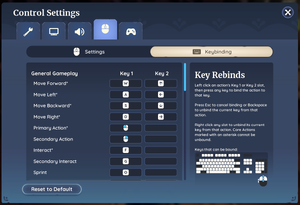
Credit: palia.wiki.gg
Frequently Asked Questions
How Do I Assign Items To Hotbar?
Open your inventory, drag desired items to the Hotbar slots. Press numbers to access them quickly.
How To Equip A Tool In Palia?
To equip a tool in Palia, open your inventory. Drag the tool to the hotbar at the bottom. Use the assigned number key or click to access it. Ensure the tool is compatible with the task for efficient gameplay. Always check your inventory for tool options.
How To Set A Hotbar?
Open the game settings. Locate the hotbar configuration section. Drag items into desired hotbar slots. Save changes.
How Do You Put Tools On The Hotbar In Space Engineers?
To put tools on the hotbar in Space Engineers, press ‘G’ to open the Toolbar Config. Drag the tool from your inventory to the desired slot on the hotbar. Release the mouse button to place the tool. Adjust the hotbar for quick access during gameplay.
Conclusion
Mastering the hot bar tool assignment enhances your gaming experience. Simple, yet effective. Adjust your tools to fit your play style. Experiment with different setups for efficiency. Quick access means faster action. Tailor your hot bar to suit your needs.
This saves time during critical moments. Practice often to memorize positions. Muscle memory develops over time. Keep it organized for easy access. This ensures smooth gameplay. Share tips with friends for more ideas. Enjoy a streamlined adventure in Palia. Make the most of your gaming journey today!

I’m Abby Lu, a passionate home cook who loves simplifying everyday meals. At PlugChef.com, I share product reviews and cooking guides to help you find the best tools for your kitchen.
Related posts:
 What Type of Cooking Utensils are Safe: Expert Picks
 What Innovations Could Blenders Make: Unleashing Future Tech
 Smart Strategies to Organize a Small Kitchen: Maximize Space
 How to Organize a Kitchen Cabinet: Expert Tips & Tricks
 How to Organize Kitchen Drawers: Expert Tips and Tricks
 How to Organize a Corner Kitchen Cupboard: Expert Tips

